VPN access was never an infrastructure strategy. For a growing number of SMBs, it’s become the gap between business continuity and a very expensive problem.
Here’s a familiar scenario: an employee working remotely connects to the company VPN, opens your line-of-business software, and gets to work. From a productivity standpoint, it functions. From a security and operational standpoint, it leaves a lot unaddressed.
This isn’t unique to any one industry. Professional services firms, healthcare administrators, financial advisors, distributors, and field-service businesses all run into the same wall. The tools people use to get work done are critical — and the infrastructure underneath them often isn’t built to match.
VPN access was designed to encrypt a connection between a remote device and an office network. It was not designed to govern what happens at either end of that connection, protect sensitive data from being copied locally, or give you any documentation if something goes wrong.
What Does a VPN Actually Do — and Not Do?
A VPN creates an encrypted tunnel between a device and your network. Traffic in transit is protected. That’s the extent of it.
What a VPN does not address:
- The security posture of the device on the other end — personal laptops, shared home computers, unmanaged endpoints
- Whether files are being downloaded and stored locally outside your control
- Who accessed what data and when — the kind of documentation auditors and insurers ask for
- Patching, monitoring, or segmentation of the servers or environment being accessed
- What happens when something breaks and there’s no clear owner of the infrastructure
For a solo operator or a two-person team, these gaps are manageable. For a business with 10, 25, or 50 distributed employees running real applications — accounting software, ERP, CRM, practice management tools — these gaps compound quickly.
Why This Is a Business Risk, Not Just an IT Problem
The conversation about remote infrastructure tends to get filtered through IT jargon. But the actual risk is operational and financial.
Consider what’s at stake when the remote environment isn’t controlled:
- Downtime during critical periods. If your line-of-business software goes down during a busy period — tax season, a major sales cycle, a product launch — there is no VPN fix for a server that’s offline or misconfigured. Someone has to own that problem. In a DIY setup, that someone is usually you.
- Data sitting on unmanaged devices. When employees download files to work locally, that data leaves your environment. If the device is lost, stolen, or infected, the data goes with it. In regulated industries this creates compliance exposure. In any industry it creates business risk.
- No audit trail. When an insurer, a client, or a regulator asks who accessed what and when, connection logs from a VPN are not sufficient. Session-level activity records, access controls by role, and documented offboarding procedures are what they’re looking for.
- Vendor confusion during incidents. When something breaks in a VPN-dependent setup, accountability is fragmented. Is it the ISP? The firewall? The server? The software vendor? Every minute spent figuring that out is a minute of downtime.
Real-World Examples
Tax and accounting firms: Remote preparers accessing QuickBooks or Lacerte over VPN, downloading client files locally to “work faster,” with no session logging and no clean offboarding when seasonal staff leave.
Healthcare admin teams: Distributed billing staff connecting to practice management software through VPN, with no MFA enforcement and shared login credentials that haven’t been rotated in two years.
Legal and financial services: Remote professionals accessing case or portfolio management tools from personal devices, with no endpoint policy and no documentation that would satisfy a cyber insurance renewal.
Distribution and field operations: Office staff using VPN to access ERP or inventory systems from home, on hardware that has never been assessed or managed by anyone.
What a Controlled Remote Environment Actually Looks Like
The businesses that handle this well aren’t necessarily spending dramatically more. The difference is where the accountability sits and whether the infrastructure is built to match how people actually work.
In practice, a well-structured remote work environment means:
- Applications run in the cloud — not on local devices. Your line-of-business software runs inside a managed hosted environment. Employees access it through a browser or thin client. Nothing installs on the endpoint, and nothing lives there when the session ends.
- Data stays in the environment. Files don’t travel to personal laptops. There’s no local copy, no USB workaround, no “I’ll finish this at home” scenario that takes data outside your control.
- Access is managed by role. A new hire gets access to what they need. A departing employee loses access in minutes. A contractor’s session can be revoked without chasing down which files they may have retained.
- MFA is enforced at the infrastructure level. Not as a policy memo that gets ignored under pressure — as a technical control that cannot be bypassed.
- Activity is logged and available. When someone asks for evidence of access controls — an auditor, a client, a cyber insurer — you have it. Not VPN connection timestamps. Actual session-level records.
- There’s a named escalation path. When something breaks at an inconvenient time, you know exactly who to call. And that party owns the resolution, not just the ticket.
None of this requires building out your own data center or hiring a full-time infrastructure team. It requires a platform that takes ownership of these outcomes — so your team can focus on the business.
How Do the Options Compare?
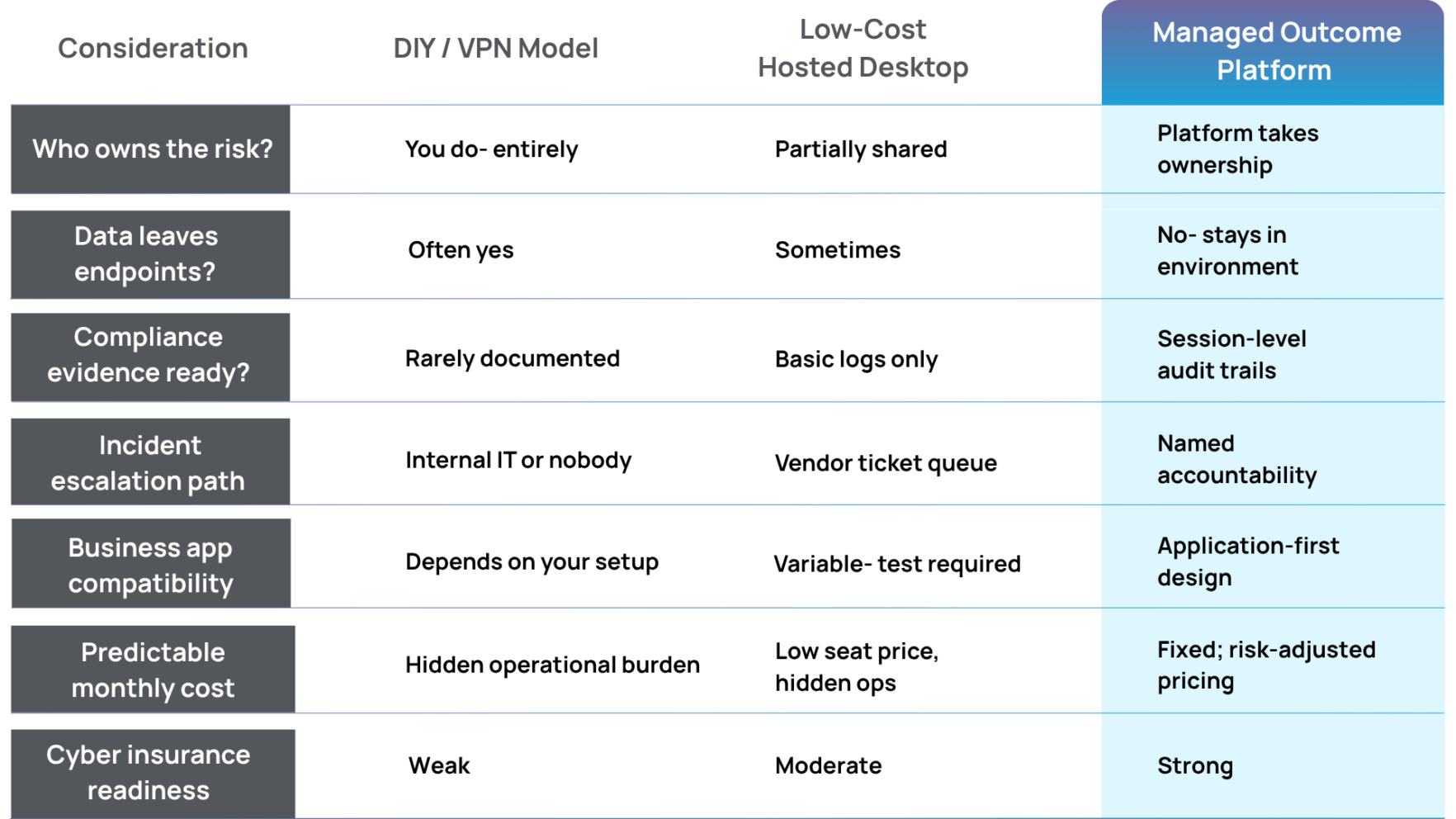
The seat-price comparison almost never holds up when something actually goes wrong. A low-cost hosted desktop with no real escalation path, no compliance documentation, and no application-specific support turns a small monthly saving into a significant incident cost.
What Should SMB Leaders Be Asking Right Now?
Whether you’re evaluating your setup for the first time, being pushed by a cyber insurer, or going through due diligence for a PE-backed transaction, these are the questions that matter:
- Can we document — with logs — who accessed sensitive business data and when?
- If an employee leaves today, can we cut their access within ten minutes?
- Does our critical business software run in a dedicated, isolated environment, or on shared infrastructure with other companies’ workloads?
- If the system goes down tonight, who owns that problem and what’s the response time?
- Would our current setup satisfy a cyber insurance underwriter’s questions about access controls, endpoint management, and data handling?
If any of those answers are uncertain, you’re not in a unique position. Most SMBs built their remote infrastructure reactively — adding solutions to immediate problems without a framework underneath. The result is a patchwork that works until it doesn’t.
The businesses that come through audits, insurance renewals, and staff transitions in good shape are the ones that made a deliberate decision about infrastructure accountability. Not necessarily the most expensive choice — the most deliberate one.
The Summit Position
Summit is built for SMBs that run real line-of-business software and need it to perform reliably in a compliant, access-controlled environment.
We don’t sell generic hosted desktops. We own the outcome: application performance, security posture, compliance controls, and a clear escalation path when something goes wrong.
That’s not a feature list. It’s accountability.
The Bottom Line
VPN access is not a remote work strategy. It’s a connection tool — and for a growing number of SMBs, relying on it as the primary infrastructure layer means absorbing risks that are both avoidable and increasingly visible to the people evaluating your business.
Regulators have caught up. Cyber insurers have caught up. And the businesses that get caught in the middle are usually the ones that treated IT as a cost to minimize rather than a risk to manage.
The infrastructure decision isn’t about finding the lowest seat price. It’s about deciding who owns the outcome when something goes wrong. That answer should be clear before you need it.
Talk to Someone at Summit
In 30 minutes, we can walk through your current remote setup, identify the gaps, and show you what a managed outcome environment looks like for a business like yours — no jargon, no hard sell.
Schedule a conversationFree Resource: Remote Work Infrastructure Checklist for SMBs
A practical one-page checklist covering access control requirements, endpoint risk factors, compliance documentation gaps, and the five questions your cyber insurer is likely to ask. Written for business owners and operators, not IT departments.
Download the free checklistLeaving VMware
Virtualization used to be a fairly simple platform solution. For all but the edge cases, VMware was the way to go. Now that Broadcom has taken ownership of VMware, however — and raised licensing costs across the board — the equation has shifted. Every day, we talk to people who are looking for a way out.
If you’re considering leaving VMware, Summit is here to help. Here’s what you need to know about making the hypervisor shift.
- VMware FAQ
- My VMware licensing costs have skyrocketed. Why is VMware so expensive?
- Does my business need to migrate off VMware?
- What are the costs of migrating off of VMware?
- Can I really replace VMware one-to-one?
- What are the risks of staying with VMware?
- Are there reasons to stay on VMware?
- My VMware license isn’t up for renewal yet: What can I do now?
- Beyond cost savings, what benefits do I get from replacing VMware?
- What VMware alternatives should I consider?
- How do I know which hypervisor option is best for my business?
- Hyper-V FAQ
- How does Hyper-V compare to other VMware alternatives?
- Do we have to rebuild all our applications to work with Hyper-V?
- What are the downsides of Hyper-V?
- Will I get locked into Hyper-V the same way we got locked into VMware?
- What are the benefits of managed Hyper-V?
- What does Hyper-V give me that VMware and Proxmox can’t?
- I don’t use Azure or Windows. Does Hyper-V still make sense?
- How hard is it to hire people trained in Hyper-V?
- Is Hyper-V secure? Does it meet compliance requirements?
- How much does Hyper-V cost? Is it cheaper than VMware?
My VMware licensing costs have skyrocketed. Why is VMware so expensive?
VMware is so expensive because it can be. When Broadcom bought VMware in 2023, it paid $61 billion because of simple math:
- VMware owned the hypervisor market — roughly 90% of virtual machines were running on VMware at the time.
- Customizations and integrations made it costly and complex for businesses to leave VMware.
- The alternatives to VMware weren’t full-featured enough to replace VMware entirely.
Broadcom had free reign to raise VMware costs. All it had to do was keep the cost of staying just a bit under the cost of switching. And yet. Broadcom continues to raise costs. On top of increasing licensing fees, Broadcom now sells software by the bundle, requiring businesses to pay for four or five products where they may only need two. It’s a 360° approach — increase the price of products, then push customers to buy more of them.
If it sounds familiar, it is. In the infrastructure business — really in most businesses — the pendulum swings in one direction, then goes a bit too far and the market corrects. It’s a story we’ve heard before, but that doesn’t mean it’s not dangerous. These market inflections can make or break careers for leaders who don’t keep up.
Does my business need to migrate off VMware?
The math will look different for every business. Can your business save money by moving off of VMware? Almost definitely. Still, there will be plenty of cases where it makes sense to stick with VMware (more on those here). A migration is no small thing. Every business has to weigh the long-term cost-savings against the short-term effort. It’s never an absolute yes or absolute no.
At Summit, we can help you decide without a thumb on the scale. If you choose to stay on VMware, we can support you on VMware. If you choose to move, we can do that too. As one of the only hosting providers able to work across tools and platforms, we can give you an honest and unbiased assessment of the pros and cons of each technology.
What are the costs of migrating off of VMware?
No one wants to move. Migrating off of VMware requires an analysis of your current infrastructure and a custom build out for wherever you choose to go. All told, a typical migration runs two to three months.
That’s on our end though. If you work with a managed infrastructure provider like Summit, we can take on a lot of the heavy lifting. The set up and switchover fall on us. We’ll interview your team at the start of the project, so we understand your business goals and the circumstances that are unique to your business. Then, you stay put while we do a full assessment of the current environment, then build out all the functionality and capacity you need to keep business running exactly as usual.
At the end, we’ll borrow your team for two to three weeks of focused testing, validation and cross training. Nothing changes until you’re confident the new hypervisor can match the functionality you get from VMware. We keep your new environment isolated until you’ve signed off, and we recommend a two-week stabilization period before fully cutting over.
Our goal is to make the move feel like a managed transition, not a crisis.
Can I really replace VMware one-to-one?
It used to be nearly impossible to find a single replacement for VMware — partially because it was just a really good product, and partially because it had a whole ecosystem of third-party applications and support built around it.
The Broadcom acquisition had the benefit of triggering a wave of interest and investment in VMware competitors. Critical applications and add-ons have been extended to work with other hypervisor platforms, and the hypervisor platforms themselves have gotten better. Today, it really is possible to create a one-to-one match for your VMware environment.
We most often recommend Hyper-V as a VMware replacement. It’s backed by Microsoft, it’s reached parity on features, and it offers a large cost savings for Windows users. It’s far from the only solution though. We regularly recommend Proxmox, particularly to companies not already using Windows. The fact that there are multiple hypervisors capable of replacing VMware feature-for-feature is a real paradigm shift for virtualization, and one we celebrate.
If you’re going to go through the trouble of a migration though, you want to get a better return than one-to-one. When businesses come to Summit to migrate away from VMware, we refocus on what they can migrate to. A migration is a natural opportunity to assess workloads, address vulnerabilities, modernize where possible and right-size your infrastructure. You should come out of it not just paying less money, but with an infrastructure that’s stronger and more agile.
What are the risks of staying with VMware?
History does tell us one thing: The cost of VMware is only going to go up. Businesses that stay on VMware because the cost today is just low enough that it beats out the friction of a migration may find that’s not the case this time next year. Then, you’re looking at the same migration, just later and without the year of cost savings you could have had.
There’s also the reality that we don’t know exactly how VMware will fare under Broadcom. Before the acquisition, VMware was a company that did one thing — virtualization — and tried to do it the absolute best. Being one of many Broadcom products may dampen that enthusiasm for innovation, or simply decrease the resources.
Are there reasons to stay on VMware?
Yes, there are several reasons for businesses to stay on VMware. The first is financial — if your licensing agreement is still a year or two away from expiration, stick with the hypervisor you’ve already agreed to pay for.
There are also operational reasons to stay on VMware. There are still applications that only work with VMware, though they’re fewer and farther between. If your team relies on functionality that other hypervisors don’t yet have, it makes sense to stay put until there’s parity. That doesn’t mean you can’t save money. If you choose to move to a managed infrastructure provider like Summit, you can offload some of the operational burden while finding efficiencies in your current setup.
If it does make sense for your business to stay on VMware, we’d encourage you to stay aware of your options. You won’t regret keeping the doors open and designing new workloads with portability in mind.
My VMware license isn’t up for renewal yet: What can I do now?
If you’re stuck in a VMware licensing agreement now, but know you’ll want to move when the term is up, you don’t have to wait to make progress. Summit can run VMware while standing up a new solution, and design the two to work in parallel. That gives you the option of a staged migration, reducing the already-low risk even further.
Hardware and software cycles rarely align perfectly. We’re used to building out plans that take that into account, solving the problems you have today while working toward the infrastructure you want tomorrow.
Beyond cost savings, what benefits do I get from replacing VMware?
Saving money may be the driver, but migrating off of VMware is an opportunity to do so much more. It’s an inflection point, and should be used to assess infrastructure as a strategic advisor of business.
When you work with a managed services provider like Summit, you’re inherently going to get add-on benefits in addition to your lower bill. You’ll get capacity, because your IT team won’t be stuck managing virtual machines. You’ll also get visibility, so you know what infrastructure you have and what infrastructure you need.
We help the organization assess its needs, which in turn forces the cross-departmental conversations that rarely happen in a business. You’ll learn how marketing uses infrastructure vs. legal, and how best to accommodate both. Rarely do we handle a migration that doesn’t spark discussion and reveal whitespace for innovation. It’s the rare opportunity to see how technology supports (or detracts) from business goals.
You’ll have our team serving as outside eyes. We’ve seen it all, and solved for it.
What VMware alternatives should I consider?
If you’re in a non-technical role and you’re asking this question, we salute you! The truth is that few executives care what technology undergirds the system, as long as it works. Rising costs mean VMware no longer works for a lot of businesses, leaving three main competitors:
- Proxmox: An open-source hypervisor that’s less expensive than other players, but doesn’t have the same level of enterprise support, or the established ecosystem most mid-sized businesses need to feel confident in a long-term infrastructure decision.
- Nutanix: An established alternative to VMware, Nutanix is also known for aggressive price increases that leave customers feeling locked in.
- Hyper-V: Microsoft’s virtualization platform, and the most practical alternative to VMware for most small- to mid-sized businesses, thanks to its stability, support and integration with existing software.
There are plenty of other upstarts in the space as well, but infrastructure is generally not the place we recommend placing a bet on something new.
At Summit, we’re provider-agnostic. We build virtual environments using Proxmox, Hyper-V and even VMware. We use the assessment phase to determine which is the best choice for your business based on your current setup, your goals and your appetite for risk.
How do I know which hypervisor option is best for my business?
For a high-level comparison of Proxmox vs. Nutanix vs. Hyper-V consider this:
Proxmox is cheaper but younger. Open-source technology is growing all the time, as developers all over the world solve problems and add features. That can be a great thing, but changing technology isn’t right for every organization. Ecosystem adoption is increasing — Veeam just added Proxmox support — but it’s not as fully connected as Hyper-V. It can be a great, cost-effective solution for companies that have the risk tolerance and the technical resources. Less so for businesses that are looking for a fool-proof option.
Nutanix can replace VMware, but it rarely has fringe benefits beyond the initial cost savings. And of course it has a reputation for capricious changes to pricing.
Hyper-V is the low-risk alternative, with additional benefits for Windows users. It’s a stable, long-time solution, with the weight of the Microsoft name behind it. Of the three, Hyper-V is the platform developers are likely to have some experience with. It can match VMware feature-for-feature, and go beyond it by integrating with Azure’s public cloud.
These are all great oversimplifications, and while Hyper-V is most often the best choice, we do recommend the other two for all kinds of business reasons.
Confused about the options? Reach out to our engineers for help finding the best fit.
We know for most executives, the underlying technology is not going to be that interesting. The ROI the right hypervisor can provide though, that’s the exciting stuff.
Why Hyper-V
If you made it this far, you’ve probably decided one of two things:
- VMware is too expensive. You can’t stay locked in to a hypervisor solution that’s constantly raising fees.
- You’re not sure it makes sense to manage your own servers anymore. You’re considering having someone else take on the task of virtualization to free your people up for strategic work.
Summit’s Managed Hyper-V service is a solution to both problems, but we hope you’ll let it be more than that. Hyper-V is a hypervisor with its own suite of benefits — something you can actively move toward, not just bump into as you move away from another solution. In the FAQ below, we’ll walk you through any concerns you may still have, and show you what’s possible when you bring business strategy to your infrastructure.
How does Hyper-V compare to other VMware alternatives?
Hyper-V is the best VMware alternative for most businesses for four main reasons:
- Stability. Hyper-V is a Microsoft product, and has been for over a decade, making it about as stable as a platform can get. Any big change would come with years of lead time, and there will always be someone to call. Microsoft’s recent investments in integrating Hyper-V with other tools also shows a commitment to keeping it around.
- Integration. Most small- to mid-sized businesses are already running on Windows, and have some Azure footprint. Hyper-V integrates natively with both. You can skip some of the compatibility issues, and get more out of the infrastructure you already have in place.
- Innovation. Hyper-V is the only hypervisor that connects directly with public cloud through a shared interface. With Azure Arc, businesses can see and control virtual machines and Azure environments in the same place, with the same security settings and the same rules. It truly is the hybrid public/private cloud that the industry has promised for decades, finally made real.
- Cost. Hyper-V makes CFOs happy because costs are predictable, unlike VMware’s increasingly algorithm-driven, bundle-heavy billing, and unlike public clouds like Azure and AWS. It also has a direct and obvious cost-savings for businesses: Windows licensing is included, allowing you to drop that bill.
Do we have to rebuild all our applications to work with Hyper-V?
No, and please don’t. Just like VMware, Hyper-V is a type-1 (bare-metal) hypervisor. What runs on one can run on the other. Any virtual machines that you have running on VMware can move to Hyper-V without needing to redeploy your applications.
That said, some vendor-supplied virtual appliances may require redeployment when you switch hypervisors. In these cases, vendors typically provide functionality to make this move as seamless as possible.
Summit designed Hyper-V environments that can run alongside pretty much anything. Each cluster is integrated with Azure Arc for a seamless cloud experience across all your public and private clouds.
Similarly, if your team has already done the work to containerize workloads and move them to Kubernetes, they can stay there. At Summit, we’re able to connect your containers to your private cloud to your public cloud, so each workload can stay in its best place.
What are the downsides of Hyper-V?
Just as the Microsoft name is a benefit, it can also be a bit of a drawback. Your technology team has likely experimented with Hyper-V in the past and found it cumbersome. And it can be for new users, though it has gotten better. When you work with Summit though, your team doesn’t have to touch that piece. Our team takes care of all the storage, backup, monitoring, disaster recovery, etc. Your team benefits. We want it to feel like we’ve waved a magic wand.
There is a drawback here too though. There aren’t too many managed infrastructure providers who can provide Hyper-V support. Most pick a technology for each job, then move all of their clients to that platform. It’s a lucrative way to operate, but it means many of our competitors don’t have the skill to support Hyper-V, and thus often leave it out of the conversation.
Hyper-V also raises valid concerns about what happens if Azure goes down. We plan for that too, designing a resilient system that allows you to access your Hyper-V even if the entire ecosystem goes hard down.
Will I get locked into Hyper-V the same way we got locked into VMware?
The goal can’t be to trade lock-in on one platform for lock-in on another. There are no indications that Microsoft is planning any big changes for Hyper-V — they tend to announce these months or years ahead of time.
Still, it’s our job to protect your business from outlier events. A large part of what we do during migration is assess your workloads and update them for portability. If the ROI on Hyper-V ever stops making sense, you’ll be in a position to adapt.
For what it’s worth, Microsoft also has an incentive to keep Hyper-V affordable. More Hyper-V users means more Windows licenses and Azure connections.
What are the benefits of managed Hyper-V?
Hyper-V is a great solution on its own, but managed Hyper-V like we provide at Summit comes with extra benefits. We smooth out the tricky parts of the technology, the parts that either aren’t immediately intuitive or require additional customization. We set everything up, the backups, the monitoring, the disaster recovery plan. Then you test it, so we can make sure everything works exactly as you need it to before we switch over.
If you’re used to traditional infrastructure as a service partners, or hyperscalers like AWS and Google Cloud, working with Summit is a very different experience. You have direct access to our team, during the build and after, so you can talk with humans and get the support you need without having to escalate through a series of machines. We want a migration to give you things you haven’t had before, to use it as an opportunity to lay better paths for the business going forward.
What does Hyper-V give me that VMware and Proxmox can’t?
Hyper-V is often cheaper than VMware, and the Microsoft name can make it feel less risky than open-source Proxmox. The biggest benefits, however, are for businesses already in the Microsoft ecosystem.
- Windows licenses are included in Hyper-V — immediately dropping those costs from your bill.
- Hyper-V can connect with Azure via Azure Arc, giving teams one orchestration system for their public and private infrastructure.
The first is self-explanatory, and pure upside for Windows users. The second is a true transformation, finally making good on the single, hybrid cloud that has been promised for decades.
Azure Arc creates a single, holistic management pane for Azure’s public cloud and Hyper-V’s private cloud. That’s great for efficiency — one set of rules and protocols, shared across environments. It also opens up entirely new possibilities, like using tools from Azure cloud in Hyper-V machines. Ultimately, Arc reduces overhead for technical teams and risk for businesses, so your engineers can use that time for real priorities.
Azure Arc gives teams a level of visibility into and control over their infrastructure that hasn’t existed before — a game-changer for peace of mind. When we do Hyper-V migrations at Summit, invariably we find stray Azure cloud accounts and other shadow IT across the organization. Arc allows us to bring it all under management in a single place.
With Azure Arc, monitoring is simplified, changes are faster and data enables holistic decisions that take the entire infrastructure into account. Less waste, better workflows, happier teams.
I don’t use Azure or Windows. Does Hyper-V make sense for businesses that don’t use Microsoft?
Even without erased license fees and a unified Azure Arc dashboard, the first two benefits are still true: Hyper-V is usually cheaper than VMware, and it has better brand recognition than Proxmox. It might make the cost savings of Proxmox more attractive, and we’ll explore that in the assessment phase. But Hyper-V is still a good hypervisor solution for any small- to mid-sized business, regardless of operating system.
How hard is it to hire people trained in Hyper-V?
The short answer: It’s harder to hire for Hyper-V expertise than VMware experience, but far easier to find than Proxmox candidates. And with managed Hyper-V through Summit, you won’t have to hire experts. We’ll naturally cross-train your team as we work together.
Is Hyper-V secure? Does it meet regulatory and compliance requirements?
Yes, Hyper-V can be set up at any level of security your business needs. If you’re also using Azure public cloud, it gets even better. Azure Arc gives you a single dashboard to manage security settings and create compliance reports. In regulated industries especially, the Microsoft brand is a real benefit. Investors know the name, they don’t require an explanation.
How much does Hyper-V cost? Is Hyper-V cheaper than VMware? What if Microsoft raises prices like Broadcom?
The cost savings that come with migrating off of VMware and onto Hyper-V can be huge. We work with a client who was spending $700,000 per month on VMware, and we cut that by more than half. And that’s not an outlier example.
Some of the cost-savings are purely licensing. With Hyper-V, unlike VMware, you buy what you need, not by the bundle. Plus, there’s the license savings for Windows users. Even the rare VMware user with a license rate below Hyper-V’s will be subject to the price increases and forced bundling, making Hyper-V an equal-or-better solution.
Most importantly, Hyper-V costs are fixed and predictable — no surprise line items, no algorithm-driven billing. We don’t randomly introduce new line items at Summit, or charge you for power you would only use in your wildest dreams. We design for what you’ll actually use. It’s intentional infrastructure, not infinite. More than that, it’s built for portability so your business is never at the mercy of one platform’s pricing whims, and you never find yourself in this position again.
The accounting industry still runs on legacy tax software.
Across CPA firms, tax practices, and finance departments, critical platforms like Sage 100, Sage 300, Lacerte Tax, Drake Tax, UltraTax CS, CCH ProSystem and ATX continue to power daily operations.
Many firms exploring accounting software cloud hosting quickly discover that these platforms were originally designed for Windows servers and office networks—not browser-based SaaS environments.
That doesn’t mean they’re disappearing. In fact, they remain the backbone of how accounting firms prepare returns, manage financial data, and serve clients. For many firms, the real goal isn’t replacing these systems—it’s running them in a way that supports modern infrastructure, remote teams, and growing compliance expectations.
Why Do Accounting Firms Still Depend on Legacy Tax Software?
The short answer: these systems solve real operational problems.
Tax preparation and financial management involve complex calculations, regulatory requirements, and historical data dependencies. Many established platforms have spent decades refining those capabilities.
For firms running high volumes of returns or managing large client portfolios, the reliability of those workflows matters more than whether the software feels modern.
Legacy platforms typically offer:
- Mature tax calculation engines
- Deep regulatory compliance support
- Extensive reporting and audit capabilities
- Integration with accounting and document systems
- Large ecosystems of trained professionals and consultants
In other words, they reflect the practical realities of accounting work.
Replacing them entirely often requires far more disruption than most firms are willing to absorb—especially in an industry where deadlines, accuracy, and repeatable workflows matter more than novelty.
Another factor rarely discussed in technology conversations is the operational risk that comes with changing tools during high-stakes work. Accounting firms spend years building internal processes around specific tax platforms. Staff learn the shortcuts, workflows, and quirks of the software. During tax season, that familiarity becomes a real advantage. Switching platforms means retraining teams, redesigning processes, and accepting a temporary drop in productivity while people adjust. For firms operating under tight deadlines and regulatory scrutiny, maintaining familiar systems is about protecting productivity, accuracy, and hard-earned institutional knowledge.
Why Do So Many Firms Host Sage and Tax Software in the Cloud?
For many accounting firms, the conversation is not about replacing legacy software—it’s about how to run it more reliably.
Platforms like Sage 100 and Sage 300 were built for Windows-based server environments. When firms want to support remote teams, seasonal staff, or multiple offices, hosting those applications in the cloud becomes a practical solution.
Cloud hosting allows firms to:
- Access accounting software from anywhere
- Centralize security and backups
- Support distributed tax teams
- Reduce reliance on office servers
Instead of rewriting their core systems, firms simply move the infrastructure supporting them into a managed cloud platform designed for accounting workloads.
What Makes Tax Software Different from Typical SaaS Applications?
Accounting software behaves differently from many modern web applications.
Tax systems often depend on several characteristics that make cloud-native development more difficult.
1. Heavy Database Workloads
Tax preparation systems rely on constant interaction with structured financial data.
Examples include:
- Client financial records
- Historical tax filings
- Regulatory tables
- Calculation engines
- Document attachments
These operations often generate large volumes of SQL database activity, which benefits from low-latency connections and high-performance storage.
Many traditional accounting platforms were optimized for this kind of environment.
2. Thick-Client Architecture
Many tax applications operate as desktop software installed on Windows systems.
This design allows the software to:
- Access local resources
- Manage large datasets efficiently
- Perform complex calculations quickly
While modern SaaS tools prioritize browser access, thick-client applications often deliver stronger performance for data-heavy workloads.
3. Compliance Logging and Auditability
Accounting firms operate under strict regulatory expectations.
Tax systems must capture:
- User activity
- Filing timestamps
- Document changes
- Approval workflows
These requirements are why many platforms maintain detailed system logs and structured data controls.
Organizations such as the American Institute of Certified Public Accountants emphasize audit evidence and data integrity as core requirements of financial operations.
Software that reliably supports those requirements tends to remain in use for a long time.
If Legacy Software Works, Why Do Firms Talk About “Moving to the Cloud”?
Because the operational environment around the software has changed.
Accounting firms today often face new realities:
- Distributed teams and remote staff
- Seasonal contractors during tax season
- Cybersecurity insurance requirements
- Growing compliance expectations
- Rising infrastructure complexity
Even if the core applications remain the same, the way they are delivered and managed needs to evolve.
Many organizations are not replacing the applications themselves.
They are modernizing where those applications run.
What Infrastructure Challenges Do Legacy Tax Applications Create?
Running traditional accounting software inside modern IT environments can introduce several operational challenges.
1. Remote Access Complexity
Legacy systems were designed for office networks.
When firms attempt to provide remote access using basic VPN connections, they often encounter:
- Slow performance
- Unstable connections
- Endpoint security concerns
As firms expand remote work, secure access becomes a more important design consideration.
Solutions like virtual desktop environments allow users to access applications through centralized infrastructure instead of relying on local machines.
2. Performance Bottlenecks
Tax applications often create intense workloads during busy periods.
Common peak-season stress points include:
- Large numbers of users logging in simultaneously
- Report generation and data processing
- File uploads and document management
When infrastructure is not tuned for these workloads, firms may experience slow systems during critical deadlines.
This is why many organizations move toward dedicated environments optimized for accounting software performance rather than generic hosting platforms.
3. Infrastructure Management Burden
Operating legacy applications internally requires ongoing responsibility for:
- Server maintenance
- Database performance
- Security patching
- Backup and disaster recovery
For many SMB accounting firms, managing that infrastructure diverts time and attention away from client work.
Managed cloud platforms designed for vertical applications can reduce that operational burden.
How Do Different Cloud Approaches Handle Legacy Accounting Applications?
Not all infrastructure models handle legacy accounting software the same way. The differences become more visible during busy periods like tax season, when performance, access, and support matter most.
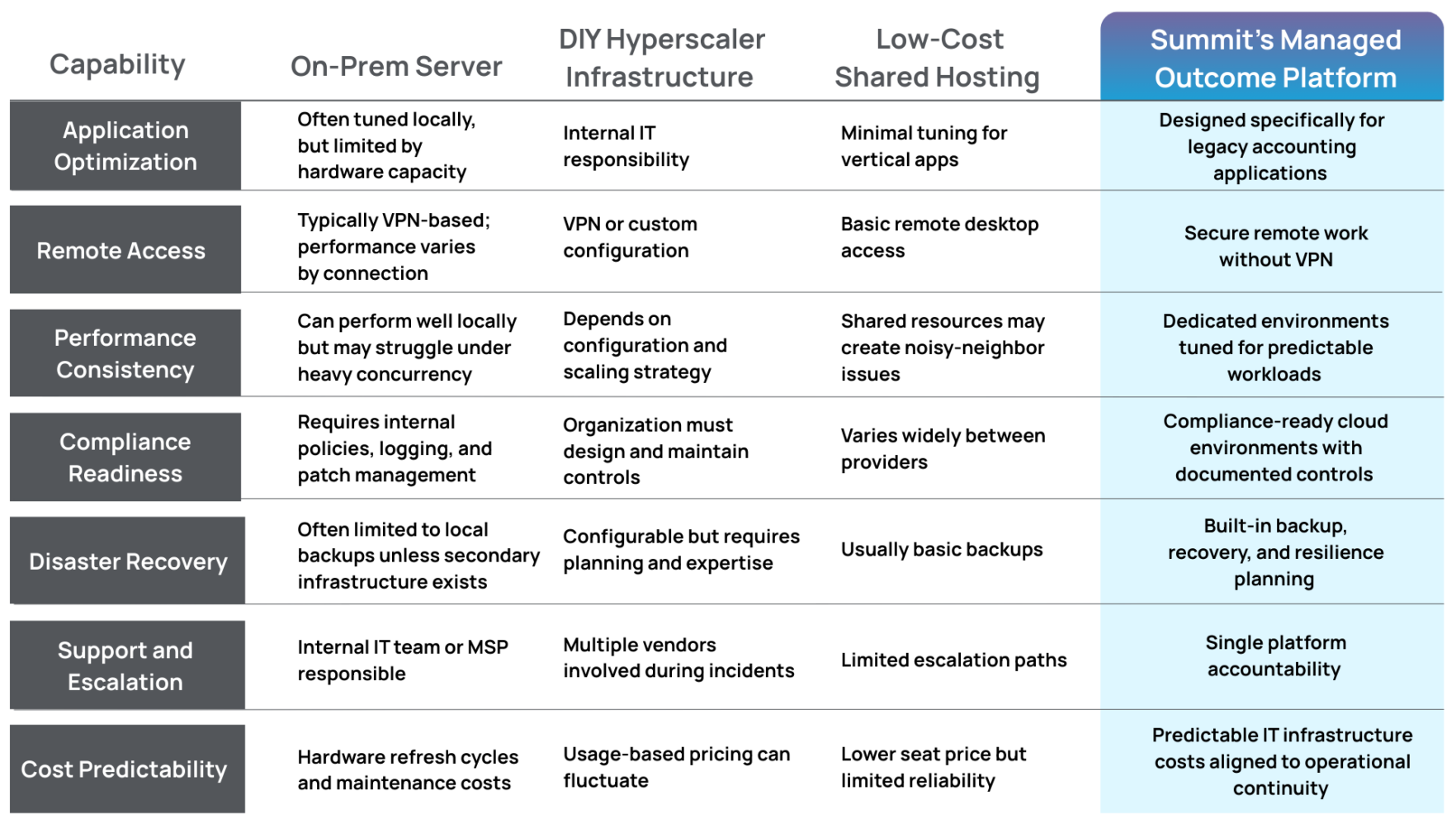
Each model offers advantages depending on an organization’s technical resources and risk tolerance.
Firms operating in compliance-heavy industries often prioritize stability and accountability over raw infrastructure flexibility.
Why Do Accounting Firms Often Choose Hosted Application Environments?
Many organizations ultimately arrive at a hybrid approach.
Instead of replacing their core software immediately, they modernize the infrastructure that supports it.
This approach allows firms to:
- Keep familiar applications that staff already know
- Support remote work securely
- Centralize security and access control
- Improve performance during busy seasons
It also reduces the need for local servers inside the office.
The result is an environment where legacy applications continue running—but within infrastructure designed for modern operational realities.
Executive Takeaway: Legacy Software Is Not the Problem
In many cases, legacy tax software continues to perform exactly as intended.
The challenge lies in the infrastructure supporting it.
When applications designed for local networks are forced into poorly configured environments, organizations experience:
- Slow performance
- Unreliable remote access
- Security gaps
- Operational friction during peak workloads
Modernizing the infrastructure layer allows firms to preserve the tools that work while improving reliability, security, and scalability.
For accounting organizations navigating tax season pressure, distributed teams, and rising compliance expectations, that balance often proves more practical than replacing their core software overnight.
The accounting industry may eventually transition toward more cloud-native platforms.
Until then, legacy tax systems will continue to play a central role—and the environments supporting them will determine how effectively firms operate around them.